



Captcha typing job. Online earning by solving captchas
Captcha filling is a legit easy typing job and guaranteed way to have additional income in Internet.
Free registration. To start work on service you only have to sign up, hit Start work and then the system will guide you through training tasks to show what to do. Next you will begin earn money online by solving captchas.

Start earn money without investment
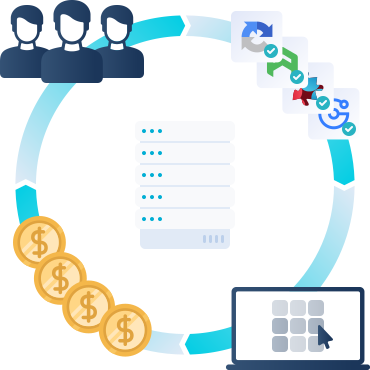
- Make money by captcha typing work in mobile
- Fill captcha and earn money without investment
- Online captcha work with instant payments
- Captcha entry jobs allows to easy earn online from home
How to earn money by captcha solving
- Sign up on the website as a worker
- Complete a short, simple onboarding training
- Start earning
- Take additional recognition training to earn more

Choose How You Want to Earn
Choose the way that works best for you: earn money by solving captchas in your browser on the website or through the app. Either way, you can get started quickly.
Install the application from Play Store
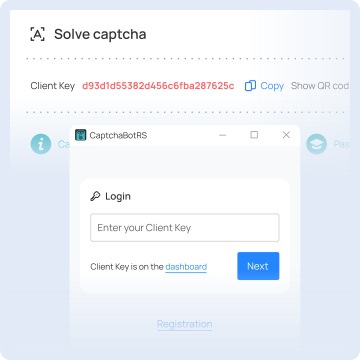
Scan the QR code from the dashboard or copy your Client Key from the dashboard and paste it to the Client Key field in the application.

Download the application installer.
Run the installer, the application will be launched automatically when installation is complete.
Copy your client key from the dashboard and paste it into the application.

 Any browser
Play & Earn
Suitable for those who prefer working in a browser — for example, from a computer.
Sign up on the website to get started quickly
Complete a short training to understand the rules
Start completing tasks on the site and earn income
Unlock new earning options as your level grows and increase your income
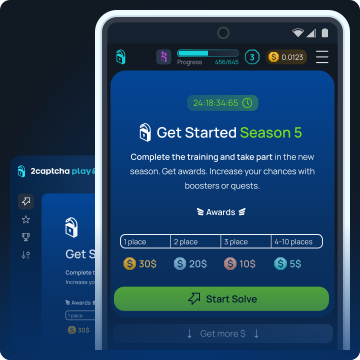
Easy earning without investments
- $0.50 for 1-2 hours, depending on service load
- Minimal payout starting from $0.50
- No payout fees. Get full earned amount
Many ways to withdraw funds







Typing job

How to become a captcha solver and earn
All you need is a computer or a smartphone with Internet access. And or course you'll need to pass our simple free training.

How to do captcha entry work?
Working on 2Captcha is quite simple — sign up, activate free account and just hit "Start work", then the system will start to show you images with text and you should type this text to the form you're given.

Who needs that and why do we pay for solving captchas?
We have customers who send us captchas to recognize. Solving these captchas can save their time and they pay for that.

Working terms
To work on the captcha entry service you only need a computer, keyboard, and internet connection. Mobile supported. You earn money for every correctly entered captcha. You can work as much or little as you want at any time, at your convenience. Our service is running online, so, we have a lot of job for you. You can work from home. Easy.

2Captcha review
2Captcha ranks highly on review sites such as. Search in Google "2captcha.com reviews" and you will find lots of reviews and guides about working with 2captcha.com.


Auto earn
Earn funds automatically by passive auto typer. All what need is to fetch the latest version of CaptchaBotRS. Run and configure accordingly indicating API KEY for authorization.
Captcha Affiliate. How to earn more?
You can earn additional funds inviting users to our service:
- Go to Affiliate program and grab your referral link that looks like: http://2captcha.com/?from=XXX where XXX is your ID in our system.
- Share the link to your friends
- Earn 10% of funds earned or spent by your partners.
How to do captcha entry work
- The idea is that there are numerous types of images that cannot be recognized automatically and there are customers who are ready to pay for entry of these images. 2Captcha have created a service suitable for both customers and workers, collect images from the customer and send them to worker in a simple interface where you need to fill the text correctly according to the shown images. Can be sure that not be scammed. 2captcha.com is a good starting point for learning how to earn money and create earn online.
- You will earn funds for every correctly entered captcha. All you need is a computer or a smartphone with internet. And or course you'll need to pass simple free training. To start work on service you only have to register an account, hit Start work and then the system will guide you through training tasks to show you what to do. Begin to earn money by solving captchas!
Worker FAQ
Is real or fake?
How to start?
Why do you pay for solving captchas?
How much can I earn?
Where can I see my earnings/balance?
How can I earn more?
There are several ways to earn more:
- use our software (https://2captcha.com/support/workers-software) to solve various captcha types, including higher-paid ones;
- keep the IP rental (https://2captcha.com/worker/proxy-share) client running and get money or a x1.25 booster for your captcha earnings;
- activate boosters in Play and Earn (https://2captcha.com/play-and-earn/boosters) to double your captcha earnings;
- invite your friends with your referral link and get 10% of their earnings. More info on our referral program you can find in referral section of FAQ.
How to solve captchas?
How to pass the training?
To pass the training you need to solve all training tasks correctly. First part of training is made to show you how to solve captchas. Tasks contain hints and instructions and even correct answers are shown to you. Second part of training is made to check what have you learned - it's an exam that you should pass by yourself.
Training tasks are very easy and if you will be careful then you will pass it quickly. You should read and understand hints and instructions shown on the screen.
I can't solve a training task! It shows that my answer is incorrect!
What should I do if I can't solve a captcha?
My account is in sleeping mode. What should I do?
My account is suspended. What does it mean?
There are three levels of restrictions for mistakes:
- Many mistakes for some time. Money stops being credited to your balance, but you still receive tasks. Crediting returns after you solve captchas correctly without mistakes.
- Very many mistakes in a row. Your account is blocked automatically and you don't receive new tasks, but you can log in and withdraw your funds. Wait for a moderator's decision or contact support.
- Permanent ban. You can't log in and can't withdraw your funds. Contact support without logging in: via the chat (https://2captcha.com/contact) or by email support@2captcha.com.
How many mistakes can I make before I get banned?
Captchas are loading too slow. How to speed it up?
Every time one of our customers sends a captcha to our server it’s immediately distributed to one of you. If captcha is not loading that means only that there’s more workers available than captchas sent by customers. And you just have to wait a little bit.
Usually we have more captchas on weekdays starting from 3PM GMT because many of our customers are in the US and they start their work on this time. We can’t speed it up, it’s not a speed issue, it happens because we don’t have a captcha for you at the moment.
Where can I find my mistakes?
Why my correct answer is shown in mistakes?
Can I resolve a mistake?
Captchas are not loading and I see SandBox on the screen.
How can I withdraw my earnings?
To withdraw your funds you should make a PayOut request. You can request PayOut to one of supported wallets:
| Wallet | Min withdrawal | Fee |
|---|---|---|
 WebMoney WMZ (https://www.wmtransfer.com/) | $0.50 | 0% (+10% bonus) |
 AirTM (https://airtm.com/) | $1.00 | 0% |
 Bitcoin Cash (https://www.bitcoincash.org/) | $0.25 | 0% |
 USDT TRC20 (https://tether.to/) | $100.00 | 0% |
| USDT BEP20 (https://tether.to/) | $2.00 | 0% |
 TON | $1.20 | 0% |
WebMoney WMZ: +10% bonus to the withdrawn amount.
Other methods like PayPal, BankTransfer, WesternUnion are NOT supported.
If you don't have any of supported wallets you should register one. And we don't know which method is the best for your country - you have to find that by yourself.
What is the minimal withdrawal amount? Why can't I withdraw less?
Minimal withdrawal amount shows how much you should have on your balance to withdraw funds to selected wallet.
Each payment system has own minimal value that can be sent through their system. That's why you can't withdraw less.
How long does it take to withdraw my earnings?
Why my payout request is still pending?
Can I withdraw funds to PayPal / WesternUnion / Bank account / cash ?
How can I change my purse / payout method?
I've entered incorrect wallet. Are my funds lost?
Can I withdraw funds if my account is suspended?
Which payout methods are available / the best in my country?
How much it is in my local currency?
I have paid a registration fee, now I want it back.
When can I make my first payout?
What does "On hold" mean on the payouts page?
Can I transfer funds to another account?
Can I withdraw money I deposited to my balance?
How do I change my password?
How do I change my email?
You can change your email in your profile settings (https://2captcha.com/profile). To change your email address you should have access to your current email. You will receive message with confirmation link on your current email. That is made for your safety.
We can't change your email manually. If you can't access your current email you should contact your email provider to restore access.
I forgot my password. How do I reset it?
How do I delete my account?
Why do I need the software?
Where can I get the software?
Do you have software for Linux, MacOS, iOS?
Error: "Your computer or network may be sending automated queries".
That happens when you solve many reCAPTCHAs. Google detects that and doesn't show new reCAPTCHA to you.
Google don't like that people are solving reCAPTCHA and earn money for that. Sometimes they show you that error message or even ban your IP.
You got to wait until your IP will be unbanned. You can also try using a different internet connection if possible.
Unfortunately we can't help you with that issue so there's no need to contact us on that matter.
Why my IP is banned by Google?
Google don't like that people are solving reCAPTCHA and earn money for that. That's why they make their captchas more and more complex and even ban IP of workers who solve captchas.
You got to wait until your IP will be unbanned. You can also try using a different internet connection if possible.
Unfortunately we can't help you with that issue so there's no need to contact us on that matter.
Can I work from a smartphone?
What is Referral Program?
Referral program allows you to invite your friends to work on 2Captcha and get some additional income: referral commission is 10% of their earnings.
Referral commission is added to your balance automatically at the end of each day when your referrals earn money. Then you can withdraw it as your earnings for solving captchas.
How can I invite referrals?
Find your referral link on the Affiliate program (https://2captcha.com/partner) page, copy the link and send to your friend using email, your favorite messenger or post it somewhere in your blog or on the forum.
People who used your link for registration on 2Captcha will be your referrals.
My friend registered. But I still have 0 referrals?
That can happen in two cases:
- your friend didn't used your link or copied it incorrectly (lost some characters from the link)
- your friend was already registered on the website
It's not possible that your friend used the link correctly but not added to referrals - this system was tested and verified many times and works perfectly.
What is IP rental?
How do I start?
- Open the IP rental page (https://2captcha.com/worker/proxy-share) in your personal cabinet.
- Click Download for Windows, install and run the client. Windows SmartScreen may ask for permission to install — allow it.
- Enter your Client Key in the program. You can find it on the dashboard (https://2captcha.com/enterpage): in the new interface — in the field below the "Workers software" block, in the classic interface — in the "Solve captchas" section.
- Choose your reward type.
The rental period starts automatically after the first statistics update. There is no level requirement — IP rental is available to all workers.
What rewards can I get?
You choose one of two reward types:
| Reward type | What you get |
|---|---|
| Money | $0.03333333 for each qualified day (1 USD per 30 days) |
| x1.25 booster | For 24 hours everything you earn by solving captchas is multiplied by 1.25 |
Which reward type should I choose?
- The booster gives more if you earn more than about $0.13 per day solving captchas.
- If you don't solve captchas or solve only a few, choose Money.
Can I change the reward type?
How does the x1.25 booster work with other boosters?
What is a qualified period?
A period lasts 24 hours and starts when the program is detected — it is not a calendar day. The period qualifies if at least one of your devices was online for at least 23 hours during it, so keep the program running continuously.
Online time from different devices is not combined.
Can I run the client on several computers?
Yes, you can run it with the same Client Key on several computers, but additional devices or IP addresses don't increase the reward: the period qualifies if at least one device is online for 23 hours, and online time from different devices is not combined.
Note: the restriction in the Terms (https://2captcha.com/support/faq/worker-terms) on using multiple devices applies to solving captchas only, not to the IP rental client.
Does the reward depend on the amount of traffic?
Can I use IP rental and solve captchas at the same time?
Does the client start automatically? How do I uninstall it?
Where can I see my statistics?
My device is not detected / the period has not started. What should I do?
- Make sure the client is running and you entered the Client Key of the same account.
- Wait for the next statistics update and refresh the page.
- Check that your computer is connected to the internet and doesn't go to sleep.
- Update the client to the latest version.
If the device is still not detected, contact support (https://2captcha.com/support).