




VK captcha solver update
Hello everyone! The VK captcha has recently received a major update aimed at complicating the generation of success_token. The social network developers have added five new parameters that are now required to obtain the token.
What's new?
As you can see in the screenshot, the captcha now requires the following additional parameters:
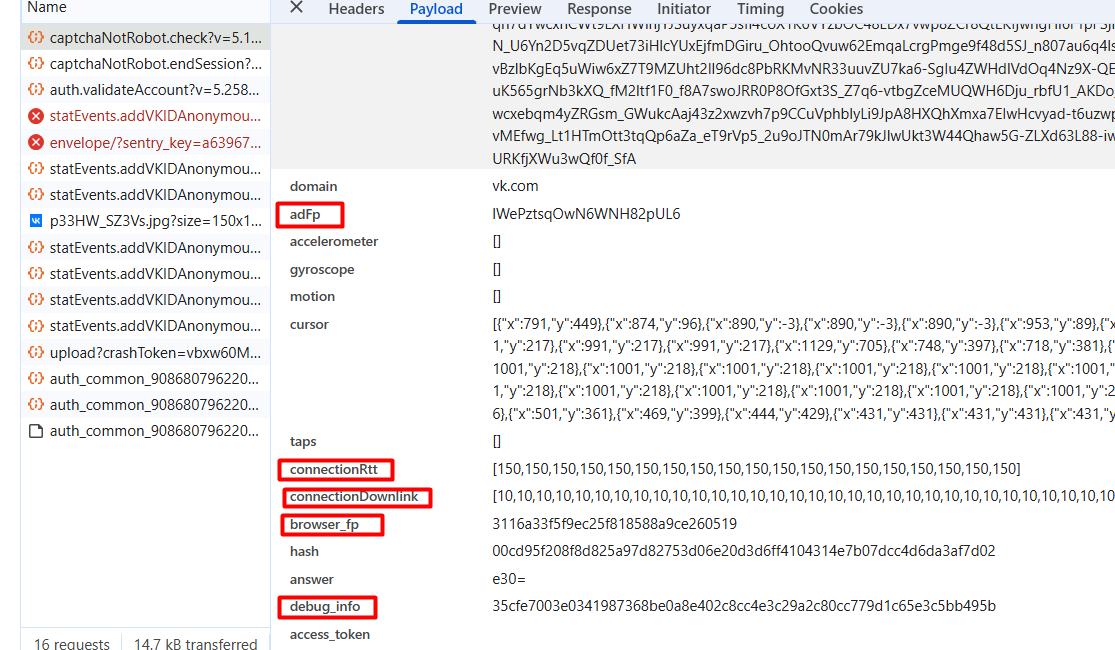
- adFp — new fingerprint parameter
- connectionRtt — connection latency information
- connectionDownlink — connection speed data
- browser_fp — browser fingerprint
- debug_info — debug information
We have completely reworked our solver to ensure everything works as smoothly as before — and we succeeded! However, there are several important recommendations that will help you receive valid tokens as often as possible.
Key recommendations for successful solving
1. redirect_uri — your main parameter
The primary parameter is now redirect_uri. This parameter expires quickly, so:
- As soon as you receive
redirect_uri— send the captcha for solving immediately - Do not delay the request — the token may become invalid
2. The session_token parameter is no longer supported
Please note: session_token has been deprecated. Use redirect_uri instead — it is now required for successful captcha solving.
3. Quality Proxies
We need your proxies to solve the captcha through them:
- Monitor your proxies for uptime and performance
- Use only stable connections
- If you receive errors despite correct parameters — check your proxies first
4. Actual User Agent
Use a modern and preferably standard user agent. The following works best:
Mozilla/5.0 (Windows NT 10.0; Win64; x64) AppleWebKit/537.36 (KHTML, like Gecko) Chrome/145.0.0.0 Safari/537.36Desktop Chrome on Windows is the optimal choice.
5. Monitor the number of attempts
If you receive 2-3 ERROR responses in a row when querying our API:
- Switch to a different VK account
- VK may temporarily block an account after too many captcha solving attempts
- Let the account "rest" before using it again
6. Increase the interval between requests
Due to the more complex algorithm, solving now takes slightly longer:
- Send the second request approximately 10 seconds after the first
- Don't rush — give the system time to process
Troubleshooting Errors
If a user receives an error while all parameters appear correct:
- Check proxy connectivity and performance
- Ensure
redirect_uriis up to date - Verify the user agent string
- If errors persist — switch to another VK account (frequent attempts may trigger a temporary ban)
Conclusion
The VK captcha update has indeed made obtaining success_token more challenging, but our solver successfully handles the new requirements. Follow the recommendations above, and you will receive valid tokens reliably and without issues.