




这篇文章有帮助吗?
How to bypass Amazon captcha

Tech builder focused on infrastructure, automation, backend systems, and scalable SaaS development
Introduction
This guide will help developers automate interactions with websites protected by Amazon CAPTCHA (AWS WAF CAPTCHA). We will cover two solving methods, extracting required parameters, and practical integration with 2Captcha via JSON requests.
What you will need:
- An account on 2Captcha
- API key from your account dashboard
- Any tool for sending HTTP requests (curl, Postman, requests library)
- Proxy (recommended for stability)
About Amazon CAPTCHA
Technology Overview
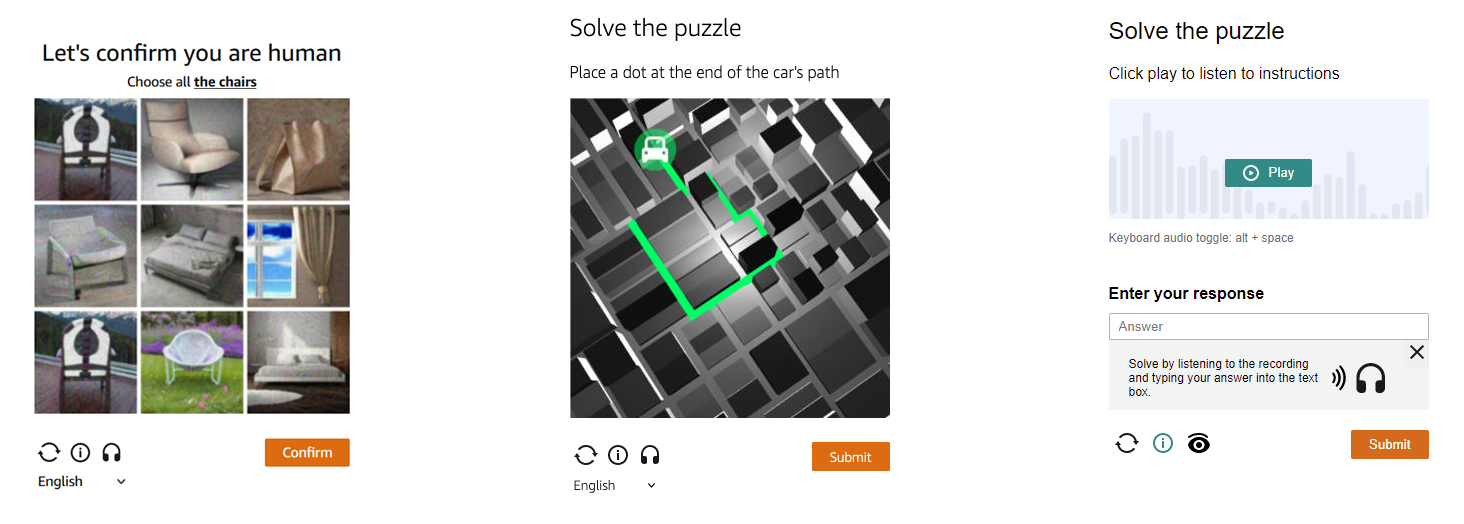
Amazon CAPTCHA (AWS WAF) is a protection system that asks the user to complete one of three tasks:
- Image selection. Mark all images containing a specific object.
- Trajectory prediction. The user indicates where an object will end up along a path.
- Audio task. Recognize and enter text from audio with background noise.
Two Solving Methods
2Captcha supports two approaches to solving Amazon CAPTCHA:
| Parameter | challenge_script version | jsapiScript version |
|---|---|---|
| Captcha script | challengeScript + captchaScript |
jsapiScript |
| Additional parameters | iv, context |
Not required |
| Setup complexity | Higher | Lower |
| Recommendation | For backward compatibility | Preferred method |
Task Types
- AmazonTaskProxyless. 2Captcha uses its own proxy pool. Suitable if you do not have your own proxies.
- AmazonTask. You provide your own proxy servers. Gives more control and flexibility.
Audio tasks can be solved via the audio recognition method, but we recommend using the specialized Amazon method. It is faster and more reliable.
Getting Started
Getting Your API Key
- Register on 2Captcha
- Open your account dashboard
- Copy your API key
For security, store the key in an environment variable and use it in requests:
bash
export APIKEY="your_key_here"Basic Request Structure
All requests to the 2Captcha API are sent via POST with the header Content-Type: application/json.
Base endpoint: https://api.2captcha.com/createTask
Page Analysis and Parameter Extraction
Finding Captcha Parameters
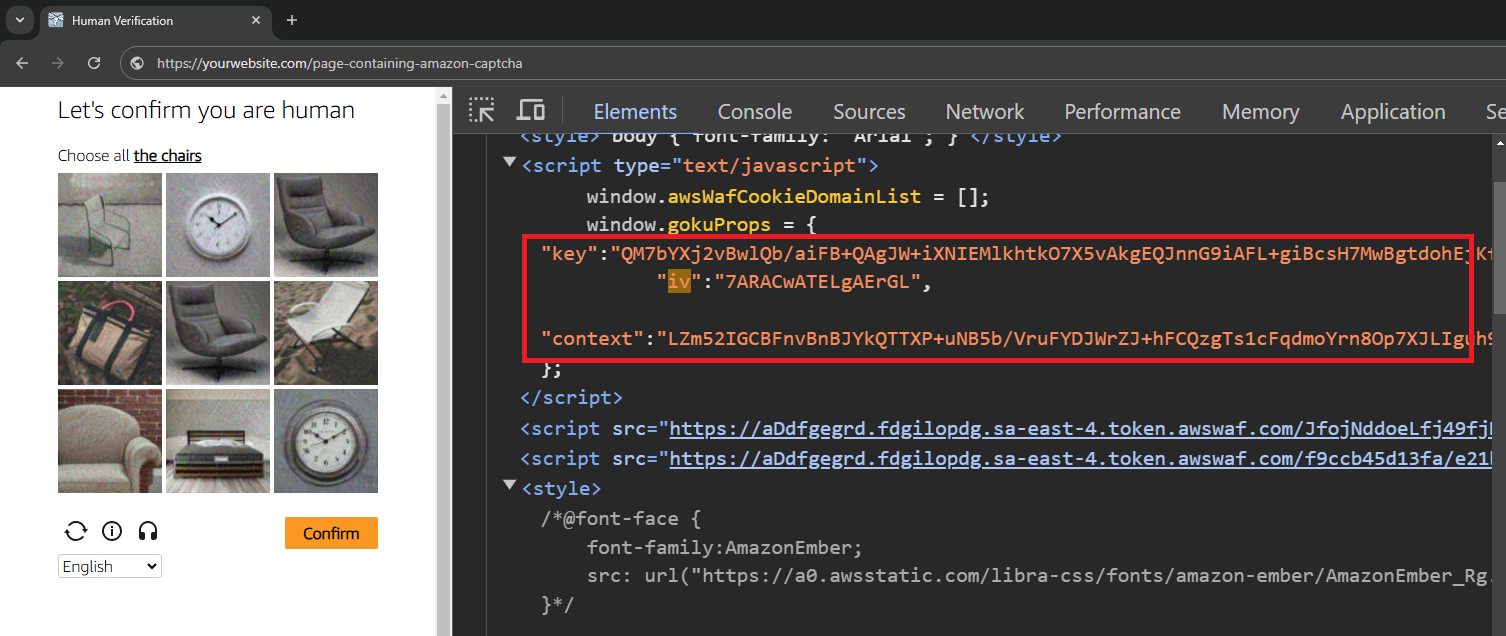
Goal: locate websiteKey, iv, context, or jsapiScript in the page code.
Open developer tools (F12) and go to the Elements tab. Find the captcha block or search for keywords: aws-waf-captcha, challenge.js, jsapi.js.
Determining the Captcha Version
Check which scripts are loaded on the page:
- If you see
challenge.jsandcaptchaScript— use the challenge_script method - If you see
jsapi.js— use the jsapiScript method
Important Notes
- Parameters update frequently. Values for
ivandcontextare valid for a limited time (about 30 seconds). Obtain fresh values for each request. - websiteKey may be constant for a single domain, but it is better to verify it is current.
- jsapiScript simplifies integration. No need to extract
ivandcontext, just pass the script URL.
Building JSON Requests
Example for challenge_script Version
json
{
    "clientKey": "YOUR_API_KEY",
    "task": {
        "type": "AmazonTaskProxyless",
        "websiteURL": "https://example.com",
        "challengeScript": "https://.../challenge.js",
        "captchaScript": "https://.../captcha.js",
        "websiteKey": "AQIDA...==",
        "context": "qoJYg...Y=",
        "iv": "CgAAXFFFFSAAABVk"
    }
}
Example for jsapiScript Version
json
{
    "clientKey": "YOUR_API_KEY",
    "task": {
        "type": "AmazonTaskProxyless",
        "websiteURL": "https://example.com",
        "jsapiScript": "https://.../jsapi.js",
        "websiteKey": "AQIDA...=="
    }
}
Sending the Request and Getting the Result
Step 1. Creating the Task
Send a POST request to https://api.2captcha.com/createTask with the body from the previous section.
Example successful response:
json
{
    "errorId": 0,
    "taskId": 74455221488,
    "status": "processing"
}
Save the taskId value, you will need it to get the result.
Step 2. Polling the Task Status
Send a POST request to https://api.2captcha.com/getTaskResult:
json
{
    "clientKey": "YOUR_API_KEY",
    "taskId": 74455221488
}
Example response while solving:
json
{
    "errorId": 0,
    "status": "processing"
}
Example response with a ready solution:
json
{
    "errorId": 0,
    "status": "ready",
    "solution": {
        "captcha_voucher": "voucher_value_here",
        "existing_token": "token_value_here"
    }
}
Step 3. Handling Statuses
| Status | Meaning | Action |
|---|---|---|
processing |
Task in progress | Repeat request after 5-10 seconds |
ready |
Solution ready | Extract captcha_voucher and existing_token |
ERROR_CAPTCHA_UNSOLVABLE |
Captcha cannot be solved | Get fresh parameters and retry |
ERROR_WRONG_USER_KEY |
Invalid API key | Check the key in your account dashboard |
Common Errors and Solutions
| Error | Possible Cause | Solution |
|---|---|---|
ERROR_CAPTCHA_UNSOLVABLE |
Outdated iv/context |
Get fresh parameters for each request |
ERROR_WRONG_USER_KEY |
Invalid API key | Check the key in your 2Captcha dashboard |
Task stuck in processing |
High load or slow proxy | Increase polling interval to 10 seconds |
| Token not accepted by site | Incorrect token application | Check where the site expects the token: form, header, or cookie |
| Proxy error | Invalid proxy credentials | Check format: proxyAddress, proxyPort, proxyLogin, proxyPassword |
Applying the Token on the Target Site
The received captcha_voucher and existing_token must be sent to the site where the captcha appeared. The method depends on the implementation:
- Hidden form field. Token added to
<input type="hidden" name="captcha_token"> - HTTP header. For example,
X-Amz-Captcha-Token: <value> - Cookie. Server may expect the token in session cookies
- JSON request body. When sending data via fetch or axios
To determine the correct method:
- Open DevTools, Network tab
- Solve the captcha manually
- Find the request sent after successful solving
- Review parameters, headers, and request body
Additional Resources
- API Documentation: Amazon AWS WAF CAPTCHA
- Test Sandbox: enable mode
- Request Examples on GitHub:
- Support: create a ticket
Pre-Launch Checklist
- 2Captcha account active, API key copied
- Captcha version determined: challenge_script or jsapiScript
- Parameters (websiteKey, iv, context or jsapiScript) extracted from current page
- Task type selected: AmazonTaskProxyless or AmazonTask
- When using own proxies, verified: proxyType, proxyAddress, proxyPort
- Logic for applying token on target site implemented
Conclusion
Solving Amazon CAPTCHA via 2Captcha simplifies automation tasks on protected sites. The new jsapiScript parameter makes integration easier: no need to extract iv and context, just pass the script URL.
Choose the method that fits your task:
- jsapiScript — if the site uses the new version, fewer parameters, simpler setup
- challenge_script — for backward compatibility with older implementations
Send requests in JSON format, handle processing and ready statuses, and apply received tokens according to the target site logic. By following the recommendations in this guide, you will be able to reliably bypass the captcha and scale your solutions.