




Was this helpful?
How to bypass Datadome сaptcha

Technical engineer
If you've encountered a DataDome captcha while scraping websites or automating web tasks — this guide is for you. We'll take a detailed look at how DataDome protection works, what parameters are required to bypass it, and show you step-by-step integration with a captcha solving service API.
Important: Captcha bypassing should only be performed for legitimate purposes — testing your own projects, research work, or with explicit permission from the resource owner.
What is DataDome?
DataDome is a bot protection platform that uses machine learning and behavioral analysis to detect automated traffic. The service protects websites, mobile applications, and APIs from scraping, brute-force attacks, and fraudulent activities.
DataDome Protection Features:
| Feature | Description |
|---|---|
| Captcha Type | Slider puzzle or token verification |
| Analysis | Browser fingerprints, mouse behavior, request headers, IP reputation |
| Response Time | Decisions made in milliseconds |
| Complexity | High — traditional bypass methods don't work |
DataDome captcha usually appears as a pop-up window with a slider that needs to be moved, or as a hidden check that returns a token in cookies. In recent implementations, the puzzle-style captcha is encountered less frequently, and more often it is just a simple slider without an image.
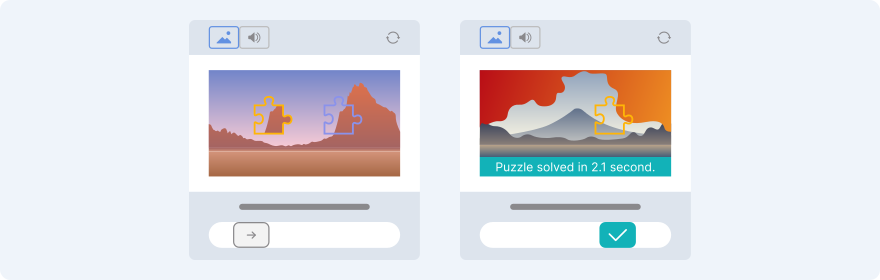
Preparation for Bypass: Required Parameters
To successfully solve a DataDome captcha via API, you need to prepare the following data:
| Parameter | Required | Description |
|---|---|---|
| type | Yes | Task type: DataDomeSliderTask |
| websiteURL | Yes | Full URL of the target page |
| captchaUrl | Yes | Value of the src attribute from the captcha iframe |
| userAgent | Yes | Browser User-Agent (must be up-to-date) |
| proxyType | Yes | Proxy type: http, socks5 |
| proxyAddress | Yes | IP or hostname of the proxy server |
| proxyPort | Yes | Proxy port (number) |
| proxyLogin | No | Login for proxy authentication |
| proxyPassword | No | Password for proxy authentication |
Critical points:
- The
tparameter incaptchaUrlmust be equal tofe. Ift=bv— your IP is blocked, change your proxy.- Use high-quality residential proxies — public proxies are often blocked by DataDome.
- User-Agent must match the one used in the browser when loading the page.
Step by step instructions: bypassing DataDome via API
Step 1: Get the captchaUrl
- Open DevTools (
F12) → Network tab - Enable Preserve log
- Perform the action that triggers the captcha
- Find the request to the
captcha-delivery.comdomain - Copy the value of the
srcattribute from the<iframe>— this is yourcaptchaUrl
Tip: If the captcha doesn't appear explicitly, check responses with status code
403— the response body may contain a link to the captcha.
Step 2: Prepare Proxy and User-Agent
python
# Example parameters
proxy = {
    "type": "http",
    "address": "192.168.1.100",
    "port": 8080,
    "login": "user123",      # optional
    "password": "pass456"    # optional
}

user_agent = "Mozilla/5.0 (Windows NT 10.0; Win64; x64) AppleWebKit/537.36 (KHTML, like Gecko) Chrome/120.0.0.0 Safari/537.36"
Step 3: Submit the Task for Solving
Task creation endpoint: https://api.2captcha.com/createTask
Example request (JSON):
json
{
  "clientKey": "YOUR_API_KEY",
  "task": {
    "type": "DataDomeSliderTask",
    "websiteURL": "https://www.example.com/",
    "captchaUrl": "https://geo.captcha-delivery.com/captcha/?initialCid=AHrlqAAAAAMAlk-FmAyNOW8AUyTH_g%3D%3D&hash=5B45875B653A484CC79E57036CE9FC&cid=noJuZstmvINksqOxaXWQogbPBd01y3VaH3r-CZ4eqK4roZuelJMHVhO2rR0IySRieoAivkg74B4UpJ.xj.jVNB6-aLaW.Bwvik7__EncryD6COavwx8RmOqgZ7DK_3v&t=fe&referer=https%3A%2F%2Fwww.example.com%2F&s=9817&e=2b1d5a78107ded0dcdc8317aa879979ed5083a2b3a95b734dbe7871679e1403",
    "userAgent": "Mozilla/5.0 (Windows NT 10.0; Win64; x64) AppleWebKit/537.36 (KHTML, like Gecko) Chrome/120.0.0.0 Safari/537.36",
    "proxyType": "http",
    "proxyAddress": "192.168.1.100",
    "proxyPort": 8080,
    "proxyLogin": "user123",
    "proxyPassword": "pass456"
  }
}
Step 4: Get the Task ID
In the response, you'll receive:
json
{
  "errorId": 0,
  "taskId": "1234567890"
}
Save the taskId to poll for the status.
Step 5: Request the Result
Result retrieval endpoint: https://api.2captcha.com/getTaskResult
Request:
json
{
  "clientKey": "YOUR_API_KEY",
  "taskId": "1234567890"
}
Successful response:
json
{
  "errorId": 0,
  "status": "ready",
  "solution": {
    "cookie": "datadome=4ZXwCBlyHx9ktZhSnycMF...; Path=/; Secure; SameSite=Lax"
  },
  "cost": "0.00299",
  "createTime": 1695214711,
  "endTime": 1695214720
}
Step 6: Use the Cookie in Requests
Add the received cookie to the headers of subsequent requests to the target site:
python
headers = {
    "Cookie": "datadome=4ZXwCBlyHx9ktZhSnycMF...",
    "User-Agent": user_agent
}
response = requests.get("https://www.example.com/protected-page", headers=headers)
Cookie lifetime: Usually 15-30 minutes. For long sessions, implement a mechanism to refresh the cookie.
Complete Python Example
python
import time
import requests

# Configuration
API_KEY = "your_2captcha_api_key"
WEBSITE_URL = "https://www.example.com/"
CAPTCHA_URL = "https://geo.captcha-delivery.com/captcha/?...&t=fe&..."
USER_AGENT = "Mozilla/5.0 (Windows NT 10.0; Win64; x64) AppleWebKit/537.36 (KHTML, like Gecko) Chrome/120.0.0.0 Safari/537.36"
PROXY = {
    "type": "http",
    "address": "192.168.1.100",
    "port": 8080,
    "login": "user123",
    "password": "pass456"
}

def create_datadome_task():
    """Creates a task to solve DataDome captcha"""
    payload = {
        "clientKey": API_KEY,
        "task": {
            "type": "DataDomeSliderTask",
            "websiteURL": WEBSITE_URL,
            "captchaUrl": CAPTCHA_URL,
            "userAgent": USER_AGENT,
            "proxyType": PROXY["type"],
            "proxyAddress": PROXY["address"],
            "proxyPort": PROXY["port"],
            "proxyLogin": PROXY.get("login"),
            "proxyPassword": PROXY.get("password")
        }
    }

    response = requests.post(
        "https://api.2captcha.com/createTask",
        json=payload
    )
    return response.json()

def get_task_result(task_id):
    """Gets the result of the solving task"""
    payload = {
        "clientKey": API_KEY,
        "taskId": task_id
    }

    # Polling with 5-second intervals, maximum 120 seconds
    for _ in range(24):
        response = requests.post(
            "https://api.2captcha.com/getTaskResult",
            json=payload
        )
        result = response.json()

        if result.get("status") == "ready":
            return result
        elif result.get("errorId") != 0:
            print(f"API Error: {result}")
            return None

        time.sleep(5)

    print("Timeout waiting for result")
    return None

def main():
    # Create task
    create_response = create_datadome_task()

    if create_response.get("errorId") != 0:
        print(f"Task creation error: {create_response}")
        return

    task_id = create_response["taskId"]
    print(f"Task created, ID: {task_id}")

    # Get result
    result = get_task_result(task_id)

    if result and result.get("solution"):
        datadome_cookie = result["solution"]["cookie"]
        print(f"✅ Captcha solved! Cookie: {datadome_cookie[:50]}...")

        # Example of using the cookie
        headers = {
            "Cookie": datadome_cookie,
            "User-Agent": USER_AGENT
        }
        response = requests.get(WEBSITE_URL, headers=headers)
        print(f"Response status: {response.status_code}")
        # Further processing...
    else:
        print("❌ Failed to solve captcha")

if __name__ == "__main__":
    main()
Error Handling
| Error Code | Description | Solution |
|---|---|---|
| ERROR_BAD_PROXY | Failed to connect to proxy | Check proxy credentials, change server |
| ERROR_CAPTCHA_UNSOLVABLE | Captcha cannot be solved | Change proxy or verify captchaUrl |
| ERROR_PAGEURL | Invalid captchaUrl | Ensure parameter t=fe and URL is complete |
| CAPCHA_NOT_READY | Solution not ready yet | Continue polling getTaskResult with 5-10 sec intervals |
Stability Recommendations:
- Proxy rotation: When encountering frequent ERROR_CAPTCHA_UNSOLVABLE errors, automatically switch proxies.
- Exponential backoff: Increase the interval between requests on retry attempts.
- Logging: Record taskId, request timestamps, and responses for debugging.
- Parameter validation: Check captchaUrl for the presence of t=fe before submitting the task.
python
def validate_captcha_url(url):
    """Validates captchaUrl correctness"""
    if "t=fe" not in url:
        if "t=bv" in url:
            raise ValueError("IP blocked (t=bv) — change proxy")
        raise ValueError("Invalid t parameter in captchaUrl")
    return True
Frequently Asked Questions (FAQ)
Why am I getting ERROR_CAPTCHA_UNSOLVABLE?
Most likely, your proxy is blocked by DataDome. Use residential proxies and ensure the t=fe parameter is present in captchaUrl.
How often do I need to refresh cookies?
datadome cookies are typically valid for 15-30 minutes. For long sessions, implement periodic refresh via repeated captcha solving.
Can I bypass without a proxy?
No. DataDome strictly validates IP addresses, and requests without proxies or with datacenter proxies will be blocked.
Are other programming languages supported?
Yes. Integration is possible via any language that supports HTTP requests (Python, Node.js, PHP, Java, C#, etc.).
Useful Links
Conclusion
DataDome is one of the most advanced bot protection systems, but bypassing it is possible with proper integration with captcha solving services. The key to success:
- High-quality residential proxies
- Up-to-date User-Agent
- Valid captchaUrl with t=fe parameter
- Proper error handling and resource rotation
By following this guide, you'll be able to reliably automate work with DataDome-protected websites while minimizing blocks and downtime.
Remember: Protection algorithms are constantly updated. Regularly check the documentation and test your solution for relevance.