




%0AAPI%20endpoint%3A%20%60https%3A%2F%2Fapi.2captcha.com%2FcreateTask%60%0A%0A%0A%23%23%23%20BinanceTaskproxyless%0A%0A%60%60%60json%0A%7B%0A%20%20%20%20%22clientKey%22%3A%20%22YOUR_API_KEY%22%2C%0A%20%20%20%20%22task%22%3A%20%7B%0A%20%20%20%20%20%20%22type%22%3A%20%22BinanceTaskproxyless%22%2C%0A%20%20%20%20%20%20%22websiteURL%22%3A%20%22https%3A%2F%2Fexample.com%2Fpage-with-binance%22%2C%0A%20%20%20%20%20%20%22websiteKey%22%3A%20%22login%22%2C%0A%20%20%20%20%20%20%22validateId%22%3A%20%22cb0bfefa598...e54ecd57b%22%2C%0A%20%20%20%20%20%20%22userAgent%22%3A%20%22Mozilla%2F5.0%20(Windows%20NT%2010.0%3B%20Win64%3B%20x64)%20AppleWebKit%2F537.36%20(KHTML%2C%20like%20Gecko)%20Chrome%2F138.0.0.0%20Safari%2F537.36%22%0A%20%20%20%20%7D%0A%20%20%7D%0A%60%60%60%0A%23%23%23%20BinanceTask%0A%0A%60%60%60json%0A%7B%0A%20%20%20%20%22clientKey%22%3A%20%22YOUR_API_KEY%22%2C%0A%20%20%20%20%22task%22%3A%20%7B%0A%20%20%20%20%20%20%22type%22%3A%20%22BinanceTask%22%2C%0A%20%20%20%20%20%20%22websiteURL%22%3A%20%22https%3A%2F%2Fexample.com%2Fpage-with-binance%22%2C%0A%20%20%20%20%20%20%22websiteKey%22%3A%20%22login%22%2C%0A%20%20%20%20%20%20%22validateId%22%3A%20%22cb0bfefa5...1fde54ecd57b%22%2C%0A%20%20%20%20%20%20%22proxyType%22%3A%20%22http%22%2C%0A%20%20%20%20%20%20%22proxyAddress%22%3A%20%221.2.3.4%22%2C%0A%20%20%20%20%20%20%22proxyPort%22%3A%208080%2C%0A%20%20%20%20%20%20%22proxyLogin%22%3A%20%22login%22%2C%0A%20%20%20%20%20%20%22proxyPassword%22%3A%20%22password%22%0A%20%20%20%20%7D%0A%20%20%7D%0A%60%60%60%0A%0A%23%23%20Response%20example%0A%0AMethod%3A%20%5BgetTaskResult%5D(%2Fapi-docs%2Fget-task-result)%0AAPI%20endpoint%3A%20%60https%3A%2F%2Fapi.2captcha.com%2FgetTaskResult%60%0A%0A%60%60%60json%0A%7B%0A%20%20%22errorId%22%3A%200%2C%0A%20%20%22status%22%3A%20%22ready%22%2C%0A%20%20%22solution%22%3A%20%7B%0A%20%20%20%20%22token%22%3A%20%22captcha%2309ba4905a79f44f...kc99maS943qIsquNP9D77%22%2C%0A%20%20%20%20%22userAgent%22%3A%20%22Mozilla%2F5.0%20(Windows%20NT%2010.0%3B%20Win64%3B%20x64)%20AppleWebKit%2F537.36%20(KHTML%2C%20like%20Gecko)%20Chrome%2F138.0.0.0%20Safari%2F537.36%22%0A%20%20%7D%0A%7D%0A%60%60%60%0A%0A%23%23%20How%20to%20find%20%60websiteKey%60%20and%20%60validateId%60%0A%0AOpen%20developer%20tools%2C%20go%20to%20the%20Network%20tab%2C%20trigger%20the%20captcha%20and%20check%20the%20requests.%20Some%20of%20them%20will%20contain%20the%20parameter%20values%20you%20need.%0A%0AAdditionally%2C%20you%20can%20get%20the%20parameters%20needed%20for%20solving%20by%20running%20JavaScript%3A%0A%0A%60%60%60JavaScript%0Alet%20originalBCaptcha%20%3D%20window.BCaptcha%3B%0Alet%20BCaptchaData%3B%0A%0AObject.defineProperty(window%2C%20'BCaptcha'%2C%20%7B%0A%20%20get%3A%20function()%20%7B%0A%20%20%20%20return%20function(args)%20%7B%0A%20%20%20%20%20%20const%20BCaptcha%20%3D%20new%20originalBCaptcha(args)%3B%0A%20%20%20%20%20%20let%20BCaptchaShow%20%3D%20BCaptcha.__proto__.show%3B%0A%20%20%20%20%20%20%0A%20%20%20%20%20%20BCaptcha.__proto__.show%20%3D%20function(args)%20%7B%0A%20%20%20%20%20%20%20%20BCaptchaData%20%3D%20args%3B%0A%20%20%20%20%20%20%20%20return%201%3B%0A%20%20%20%20%20%20%7D%3B%0A%20%20%20%20%20%20%0A%20%20%20%20%20%20return%20BCaptcha%3B%0A%20%20%20%20%7D%3B%0A%20%20%7D%0A%7D)%3B%0A%60%60%60)
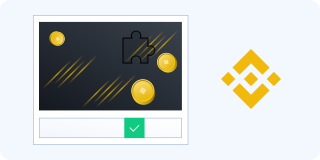
Binance captcha
Token-based method for automatic Binance captcha solving.
Method specification
- BinanceTaskproxyless — we use our own proxy pool to solve captchas
- BinanceTask — we use your proxies
BinanceTaskproxyless method specification
| Property | Type | Required | Description |
|---|---|---|---|
| type | String | Yes | Task type: BinanceTask or BinanceTaskproxyless |
| websiteURL | String | Yes | Full URL of the page where the captcha is loaded |
| websiteKey | String | Yes | Value of bizId, bizType, or bizCode from page requests |
| validateId | String | Yes | Dynamic value of validateId, securityId, or securityCheckResponseValidateId |
IMPORTANT: some parameter values are dynamic — they change every time the Binance page is rendered.
BinanceTask method specification
| Property | Type | Required | Description |
|---|---|---|---|
| proxyType | String | Yes | Proxy type: http socks4 socks5 |
| proxyAddress | String | Yes | Proxy server IP address or hostname |
| proxyPort | Integer | Yes | Proxy server port |
| proxyLogin | String | No | Login used for authentication on the proxy server |
| proxyPassword | String | No | Password used for authentication on the proxy server |
Request example
Method: createTask
API endpoint: https://api.2captcha.com/createTask
BinanceTaskproxyless
json
{
    "clientKey": "YOUR_API_KEY",
    "task": {
      "type": "BinanceTaskproxyless",
      "websiteURL": "https://example.com/page-with-binance",
      "websiteKey": "login",
      "validateId": "cb0bfefa598...e54ecd57b",
      "userAgent": "Mozilla/5.0 (Windows NT 10.0; Win64; x64) AppleWebKit/537.36 (KHTML, like Gecko) Chrome/138.0.0.0 Safari/537.36"
    }
  }
BinanceTask
json
{
    "clientKey": "YOUR_API_KEY",
    "task": {
      "type": "BinanceTask",
      "websiteURL": "https://example.com/page-with-binance",
      "websiteKey": "login",
      "validateId": "cb0bfefa5...1fde54ecd57b",
      "proxyType": "http",
      "proxyAddress": "1.2.3.4",
      "proxyPort": 8080,
      "proxyLogin": "login",
      "proxyPassword": "password"
    }
  }
Response example
Method: getTaskResult
API endpoint: https://api.2captcha.com/getTaskResult
json
{
  "errorId": 0,
  "status": "ready",
  "solution": {
    "token": "captcha#09ba4905a79f44f...kc99maS943qIsquNP9D77",
    "userAgent": "Mozilla/5.0 (Windows NT 10.0; Win64; x64) AppleWebKit/537.36 (KHTML, like Gecko) Chrome/138.0.0.0 Safari/537.36"
  }
}
How to find websiteKey and validateId
Open developer tools, go to the Network tab, trigger the captcha and check the requests. Some of them will contain the parameter values you need.
Additionally, you can get the parameters needed for solving by running JavaScript:
JavaScript
let originalBCaptcha = window.BCaptcha;
let BCaptchaData;

Object.defineProperty(window, 'BCaptcha', {
  get: function() {
    return function(args) {
      const BCaptcha = new originalBCaptcha(args);
      let BCaptchaShow = BCaptcha.__proto__.show;

      BCaptcha.__proto__.show = function(args) {
        BCaptchaData = args;
        return 1;
      };

      return BCaptcha;
    };
  }
});- API v2
- API Methods
- Interactive Captchas
- reCAPTCHA v2
- reCAPTCHA v3reCAPTCHA v3 Enterprise
- reCAPTCHA v2 Enterprise
- reCAPTCHA Grid
- Arkose Labs captcha
- FunCaptcha Grid
- GeeTest
- Turnstile
- Capy Puzzle captcha
- KeyCAPTCHA
- Lemin captcha
- Amazon captcha
- CyberSiARA
- MTCaptcha
- Cutcaptcha
- Friendly Captcha
- DataDome captcha
- atbCAPTCHA
- Tencent (TenDI)
- Prosopo Procaptcha
- CaptchaFox
- VK Captcha
- Temu Captcha
- Altcha Captcha
- Yidun - NeCaptcha
- Binance captcha
- Hunt captcha
- TSPD captcha
- Basilisk captcha
- Imperva (Incapsula)
- Alibaba captcha
- Yandex SmartCaptcha
- Simple Captchas
- Useful links


